Section outline
-
The links below will take you to downloads and websites you may find useful.
Feel free to download and use.

-

Make your own word search puzzle
This page allows you to create word search puzzles using your words. It has been used by many types of people, with teachers and students being groups that stand out.
Please enter a set of words. When you are done, hit the "Puzzle" button to generate a word search puzzle. Once the puzzle is displayed, you can use the "Printable HTML" or "Printable PDF" buttons to get a clean page suitable for printing with your web browser.The web page generated will remain on this server for about two months. If you want to ensure that you have a copy of the generated puzzle, make sure you save a copy.
-

The Crossword puzzle maker is used to make simple crossword puzzles. It turns out that good crossword puzzles of the type found in newspapers are fairly hard to generate, and require a pool of lots of words, not all of which are used. This program puts all of the words you specify (no more, no less) into a simple crossword puzzle. To acces the generator click on the link at the bottom of this box.
If you are looking for pre-constructed crossword puzzles, you might want to take a look at https://thinks.com/webguide/crosswords.htm. Another puzzle site which allows you to make puzzles is https://www.puzzlemaker.com/.
-

Google Earth Explore, Search and Discover
Want to know more about a specific location? Dive right in -- Google Earth combines satellite imagery, maps and the power of Google Search to put the world's geographic information at your fingertips.

Fly from space to your neighborhood. Type in an address and zoom right in.

Search for schools, parks, restaurants, and hotels. Get driving directions.

Tilt and rotate the view to see 3D terrain and buildings.

Save and share your searches and favorites. Even add your own annotations.
Click on the World above to begin your adventure.
Once you try it you'll be hooked.
Have fun!
-
Advanced JPEG Compressor

Advanced JPEG Compressor for Windows, the world's leading software for compressing digital images in JPEG format. Use Advanced JPEG Compressor for a variety of personal or business reasons:
- Easily reduce the large file sizes of your graphic files
Impressive file size reduction even without a picture change! Smaller files take less space, provide faster uploads/downloads. Effectively optimize photos for faster loading from the Web. Faster e-mail smaller image files, avoid exceeding size limits. Compress scanned documents for storage/transferring purposes.
Advanced JPEG Compressor easily makes your digital photos any size you want!
Get resized photos in any specified dimensions or file sizes you need: thumbnails, photos for a web site, auction pictures, ads, web graphics, for job tasks, etc.- Prepare images that meet any special size requirements
- Convert images to JPEG from other formats
Save your time on processing multiple images the same way! Advanced JPEG Compressor lets you to do this just in several clicks. Create custom profiles for different batch processing tasks.
Digital camera users will benefit the most from Advanced JPEG Compressor: advanced noise removing filters, photo correction options, cropping, EXIF options, and more.
What's special ? The QUALITY. The original quality of your images preserve the most advanced, hi-end algorithms we have developed and implemented in Advanced JPEG Compressor.Click on the picture above to download the program
-
Graph Paper Generator
-
Cute PDF
-
Design Gallery Live
-
Winzip10

WinZip, the original and most popular compression utility for Windows, is a powerful and easy-to-use tool that quickly zips and unzips your files to conserve disk space and greatly reduce e-mail transmission time.
How do I set up Winzip on my computer?
- Double-click the winzip100.exe file on your desktop and click the Setup button,
- When the setup asks which folder to install Winzip into, please click OK and Accept the default settings,
- On the screen that says "Thank you for installing Winzip", click the Next button
- Click Yes to accept the licence agreement terms,
- On the screen that says "Winzip Quick Start", click the Next button,
- On the screen that says "Select Wizard or Classic then click Next", select the Classic option and click the Next button,
- On the next screen, select the Express Setup option and click the Next button,
- On the final screen, click the Finish button,
- Winzip will then automatically open, showing a tip of the day,
- Click the Close button and close the Winzip window.
-
You Send IT
-

Spybot Search and Destroy 1.4
An excellent means of keeping information and your computer safe.
As with viruses, spyware has caused such controversy that a number of software programmers have developed utilities to eliminate it.
Such is the feeling surrounding the issue that many of these are either shareware or completely free.
Perhaps the most complete freeware tool is Spybot Search and Destroy. This not only sniffs out and removes any hidden fiends, it can also immunise your system against over 400 different spies.
Regularly updated data files help keep you protected, and the package even supports over 30 languages.
-
MAGNIFY
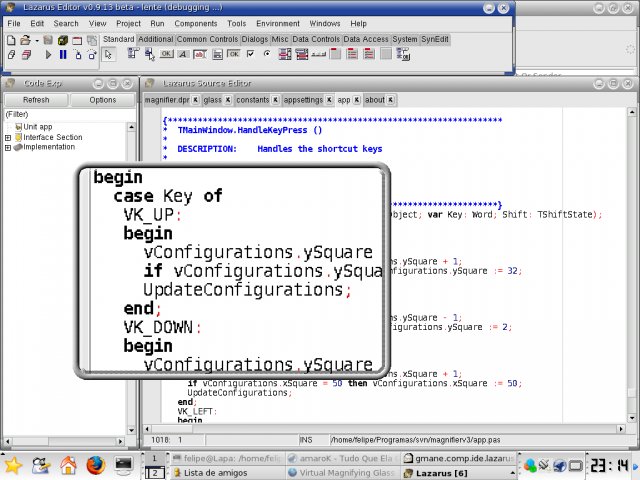
Virtual Magnifying Glass is designed for visually-impaired and others who need to magnify a part of the screen. Unlike most similar programs it does not open a separate window for the magnification but instead puts a movable magnifying glass on screen.
-
Domesday Book
-
Yahoo Desktop Search

-
Microsoft Clear Type Tuner
This tool will clean up the way fonts are displayed on LCD screens such as laptop/notebook screens and flat LCD monitors. It also makes a difference to projector displays.
These type of screens often have difficulty displaying fonts and this utility from Microsoft can make a big difference. Give it a try.

Please note that the online tuner does not currently work with Windows Vista.
-
Click here to download ClearType
ClearType information
 About Microsoft ClearType
Microsoft ClearType is an unprecedented innovation in font display technology that dramatically improves font display resolution and marks a genuine breakthrough in screen readability.
ClearType in Windows XPWindows XP is Microsoft's first operating system release to include system wide ClearType support. Use our updated ClearType Web interface or downloadable PowerToy Tuner to activate ClearType and tune your ClearType settings.
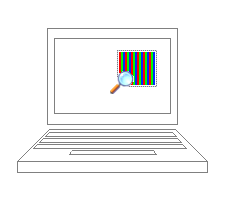
ClearType magnified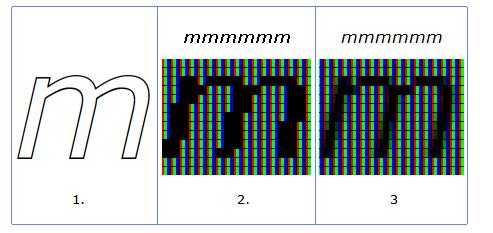
This is a picture of ClearType under extreme magnification, with the sub-pixels of an LCD explicitly rendered to show the structure of the ClearType letterforms.
-
-
Zamzar File Conversion Software
-

Translate an entire webpage or just the odd word with Google Translator. From this link you can also set your home page to Google in any language.
-

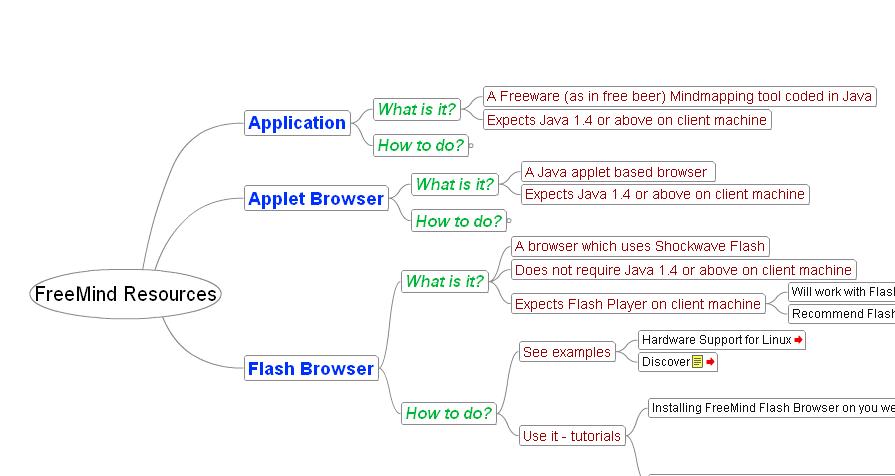
FreeMind - Free Mind Mapping Software
-
-
Audacity

Audacity is free, open source software for recording and editing sounds. It is available for Mac OS X, Microsoft Windows, GNU/Linux, and other operating systems.
-
AccessApps - free downloads
JISC Access Apps downloadable software applications that can be kept on a USB key and used on any computer. Read all about the various applications available.

Background Colour
Font Face
Font Kerning
Font Size
Image Visibility
Letter Spacing
Line Height
Link Highlight
Text Colour